
Backwashing a sand filter is not a fixed ritual you run for a set number of minutes. It is a short sequence you perform safely, judge against your filter’s own clean pressure and the color of the discharge water, and stop when the manufacturer’s condition is met. Done that way it clears trapped debris and restores flow. Done carelessly, by changing the valve with the pump running, skipping the rinse, or running a blind timer, it can waste water or send dirty water back into the pool. This page walks the correct cycle and, just as important, how to decide when to start and stop.
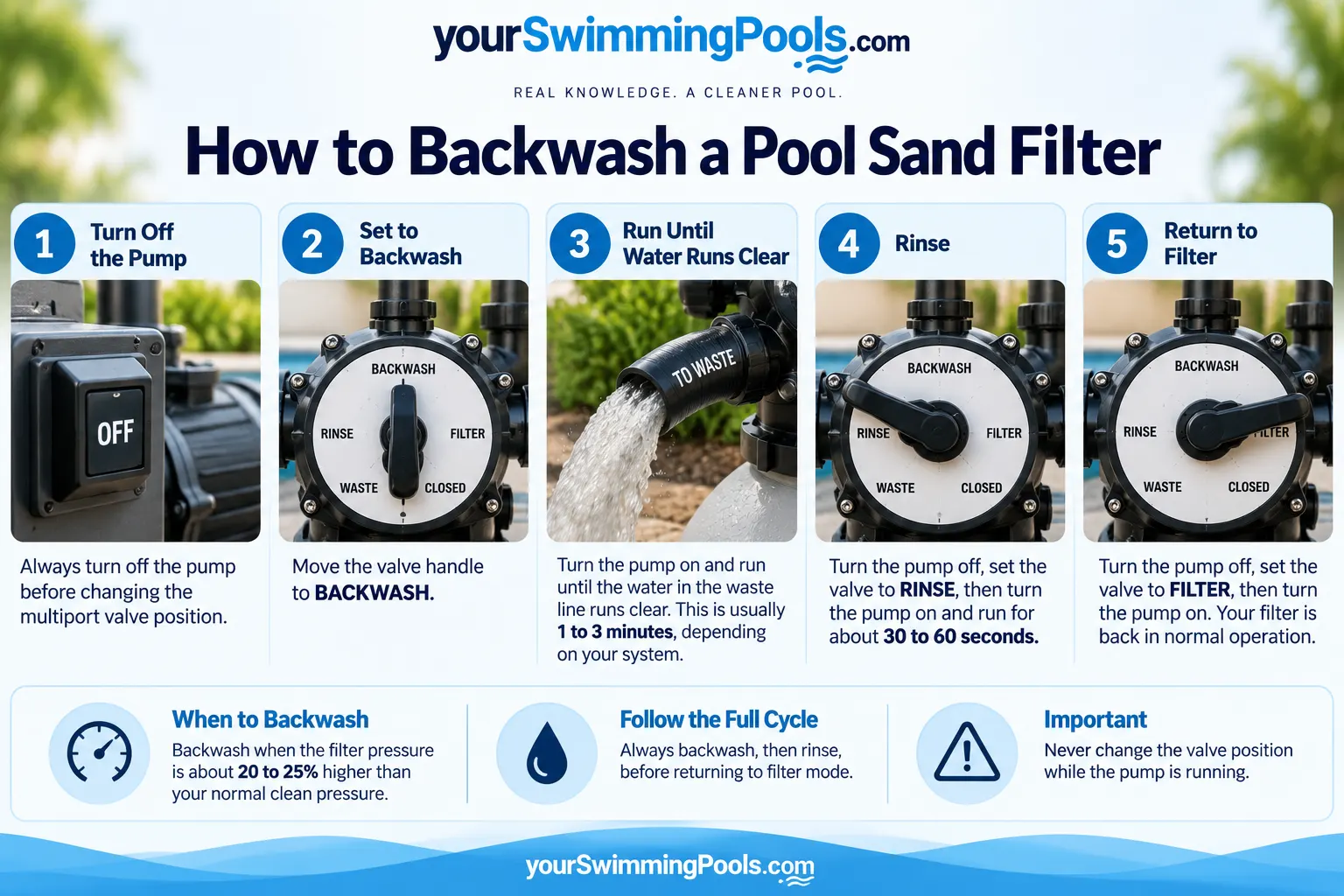
The typical times and pressure figures shown above are common industry ranges, not universal rules. Your filter’s manual sets the exact stopping condition and thresholds for your model, and those take priority over any general number.
When a sand filter actually needs backwashing
Backwash based on pressure relative to your filter’s clean baseline, not on a calendar. As the sand bed traps debris, flow resistance rises and the pressure gauge climbs above the number it read when the filter was freshly cleaned. That rise is the signal.
To use it, you first need to know your clean pressure. After a proper backwash and rinse, with the pump running under normal conditions, note the stable gauge reading. That is your baseline. A meaningful rise above it means it is time to backwash again. Some manufacturers specify a numerical increase to act on: Hayward’s high-rate sand filter manual, for example, gives a rise of about 8 to 10 psi above the clean starting pressure, and notes that the actual pressure depends on the pump and piping. Use your manufacturer’s threshold when one is provided rather than treating any single number as an industry-wide rule, and note that our page on what high pool filter pressure means uses that same 8 to 10 psi rise as a general cleaning cue.
You can also express the rise as a percentage. As a worked example only: if your clean pressure is 12 psi and the gauge now reads 15 psi, the increase is 15 minus 12 = 3 psi, which is 3 / 12 times 100 = 25 percent above baseline. That arithmetic is just a way to describe the rise. It is not a universal “backwash at 25 percent” rule, because clean pressures and thresholds differ between filters.
Before you start
Two things matter before you touch the valve. First, know where the discharge water will go. Backwashing sends dirty water out of the waste line, away from your normal filtration path, and it needs to reach an appropriate, approved location for your area and setup. Second, understand the one rule that protects your equipment.
Turn the pump off before moving the multiport valve, every time. Change the valve position with the pump off, then turn the pump back on. Moving the valve while the pump is running can damage the control valve, which is why manufacturers such as Pentair and Hayward instruct you to stop the pump before changing valve positions. Only depart from this if your exact filter’s manufacturer explicitly documents a different procedure.
The backwash and rinse sequence
Each step is short. The pattern is always the same: pump off, move the valve, pump on.
- Turn the pump off. Nothing moves on the valve while it is running.
- Set the valve to BACKWASH. This reverses flow up through the sand bed and out to waste.
- Turn the pump on and watch the discharge. Through the sight glass or at the waste outlet, the water starts dirty.
- Run until the discharge runs clear, which is the manufacturer’s usual stopping condition. This is commonly on the order of a couple of minutes, but let the water, not a timer, tell you when to stop. Follow your manual if it specifies otherwise.
- Turn the pump off.
- Set the valve to RINSE.
- Turn the pump on and run the rinse for the time your filter manufacturer specifies. This resettles the bed and clears the loosened debris from the plumbing path.
- Turn the pump off.
- Return the valve to FILTER, turn the pump on, and check the gauge. The pressure should now sit back near your clean baseline.
Steps 1 through 4 do the cleaning; the rinse and return-to-filter steps are part of the complete cycle and should not be skipped, because that is where the water can get worse instead of better.
Why the rinse step matters
After a backwash, the sand bed has been lifted and disturbed and the plumbing between the filter and the returns still holds loosened debris. Going straight back to FILTER can push that debris into the pool. The RINSE position runs water through the settled bed and out to waste briefly, letting the bed resettle and flushing that path before normal filtration resumes. It is a short step, but it is the difference between clearer water and a cloudy return.
How long the rinse runs is set by your manufacturer, and it genuinely varies between models. As two documented examples: Hayward’s high-rate sand filter owner’s manual specifies a rinse of roughly one half to one minute, while Pentair’s Sand Dollar and Cristal-Flo II sand filter manual calls for a rinse of at least two minutes. Those are different figures for different filters, which is exactly why a number copied from another website is not a substitute for your model’s manual.
When to stop backwashing
Stop on the manufacturer’s condition, which is usually the discharge water running clear rather than a fixed clock time. If your model’s manual gives a specific duration or a sight-glass instruction, follow that exactly for your model. Running far longer than the discharge stays dirty does not clean the bed further; it just sends more water down the waste line.
Common mistakes that make the water worse
- Moving the valve with the pump running. The equipment risk covered above, and worth repeating because it is the most damaging habit.
- Skipping the rinse or returning to FILTER before finishing it, which lets loosened debris reach the pool.
- Running a blind timer instead of watching the discharge and the gauge. The stopping condition is what the water shows, not a number you set.
- Backwashing too often. Each cycle discharges water and does nothing useful if the filter was not actually loaded. Let the pressure rise above baseline justify it.
- Backwashing far too long, which wastes water without extra benefit once the discharge is clear.
- Not checking where the waste water goes, which can create a drainage or compliance problem outside the pool.
- Treating pressure as a fixed universal number rather than your filter’s own clean baseline.
- Assuming every sand filter follows the same procedure. Valves, thresholds, and rinse instructions vary by model.
What to do if the pressure stays high
If, after a complete and correct backwash and rinse, the gauge does not return toward your clean baseline, do not just keep backwashing in the hope it eventually drops. Repeating the cycle wastes water and does not address the cause. A pressure reading that stays high can point to several different things, including a persistent restriction upstream, a filter media issue, a valve problem, a plumbing restriction, or even a faulty gauge. Those need diagnosis rather than more backwashing.
Start with the basics: check the pump and skimmer baskets and confirm no return valve is partly closed, since an upstream flow restriction can look like filter pressure. If the reading still will not settle, work through what high pool filter pressure means for the full diagnostic path rather than guessing here.
Water use, kept honest
Backwashing uses water, but there is no single universal amount, because it depends on your filter’s flow during backwash and how long you run it. If your model’s manual states a backwash flow rate and a duration, you can estimate the volume for that system as flow rate multiplied by time. Anything beyond that is a guess, so we do not publish a universal per-backwash gallon figure. The practical lever is simple: backwash when the pressure justifies it, stop when the discharge is clear, and you use only the water the job needs. If your water is metered or discharge is restricted where you live, that restraint matters, and it also feeds directly into the sand versus cartridge cost comparison in our five-year ownership cost tool.
A note on sand loss
A little fine material in the first moments of a backwash is normal. Persistent sand blowing to waste or returning to the pool is not, and it usually points to an equipment or media issue, such as a damaged lateral or standpipe, rather than something a longer backwash fixes. If you see ongoing sand loss, treat it as a repair to diagnose, not a backwash to extend. We do not publish a per-backwash sand-loss figure, because there is no reliable universal number.
Manufacturer differences
The sequence on this page is the standard multiport backwash and rinse cycle, but the specifics are set by your filter’s maker: the exact stopping condition, any stated durations, the pressure threshold that should trigger a cleaning, and whether your model even uses a standard multiport valve. Where your manual differs from any general figure here, the manual wins. This page is written to be safe and useful across common sand filters, not to replace the documentation for your exact model.
Quick checklist
- Know your clean baseline pressure and backwash when the gauge rises meaningfully above it.
- Pump off before every valve move; pump on after.
- Backwash until the discharge runs clear, not for a fixed time.
- Always rinse before returning to FILTER.
- Return to FILTER and confirm the gauge is back near baseline.
- If pressure stays high, stop and diagnose rather than repeat.
- Send waste water to an appropriate, approved location.
Sources
The safety instruction to stop the pump before changing valve positions, and the warning that moving the valve against a running pump can damage the control valve, are stated in manufacturer documentation, including the Pentair Sand Dollar and Cristal-Flo II sand filter manual and the Hayward high-rate sand filter owner’s manual. Those two manuals are also the source of the model-specific figures cited on this page: Hayward’s manual gives the roughly 8 to 10 psi pressure rise and a rinse of about one half to one minute for that model, while Pentair’s specifies a rinse of at least two minutes for its filters, which is the manufacturer variation this page is built around. The general backwash and rinse methodology follows standard practice documented in Pentair and Sta-Rite pool training material. Where your own model’s manual differs from any figure here, follow the manual.
Frequently asked questions
How do I know when to backwash my sand filter?
Watch the pressure gauge against your filter’s clean baseline. When it rises meaningfully above the reading you noted right after a clean backwash and rinse, it is time. Some manufacturers give a number for this: Hayward’s high-rate sand filter manual, for example, cites a rise of about 8 to 10 psi. Follow your model’s manual for the exact threshold rather than a universal number.
How long should I run the backwash?
Until the discharge water runs clear, which is the usual manufacturer stopping condition, commonly a couple of minutes but not a fixed rule. Let the water tell you, and follow your manual if it specifies a duration or a sight-glass condition.
Do I really need the rinse step?
Yes. After backwashing, the bed is disturbed and the plumbing holds loosened debris. A short rinse lets the bed resettle and flushes that debris to waste, so returning to FILTER does not push it into the pool.
Why should the pump be off when I move the valve?
Moving a multiport valve against a running pump can damage the valve’s internal seal. Turning the pump off first is the simplest way to avoid turning routine maintenance into a repair. Only deviate if your filter’s manufacturer documents a different procedure for your exact model.
The pressure did not drop after backwashing. What now?
Do not keep backwashing. Check the pump and skimmer baskets and any partly closed return valve first, since an upstream restriction can mimic filter pressure. If it still will not settle, work through our page on high pool filter pressure to diagnose the cause.
